
Best AI Trip Planner Apps in 2026: 5 Apps Compared

humbrolldo
Updated November 2026 · 8 min read
Every AI trip planner app can write "Day 1: old town, Day 2: museum" in ten seconds. That part is solved. What still separates the apps is everything around the plan: where the places come from, whether you can book without leaving, and whether the app is any use once you are standing on the street.
We compared five apps people actually use to plan trips with AI in 2026: DocentPro, Mindtrip, Layla, Wanderlog and ChatGPT. DocentPro is our own app, so read this with that in mind. Every feature below was checked against each product's official site and app-store listing in November 2026, and where a competitor is the better pick, we say so.
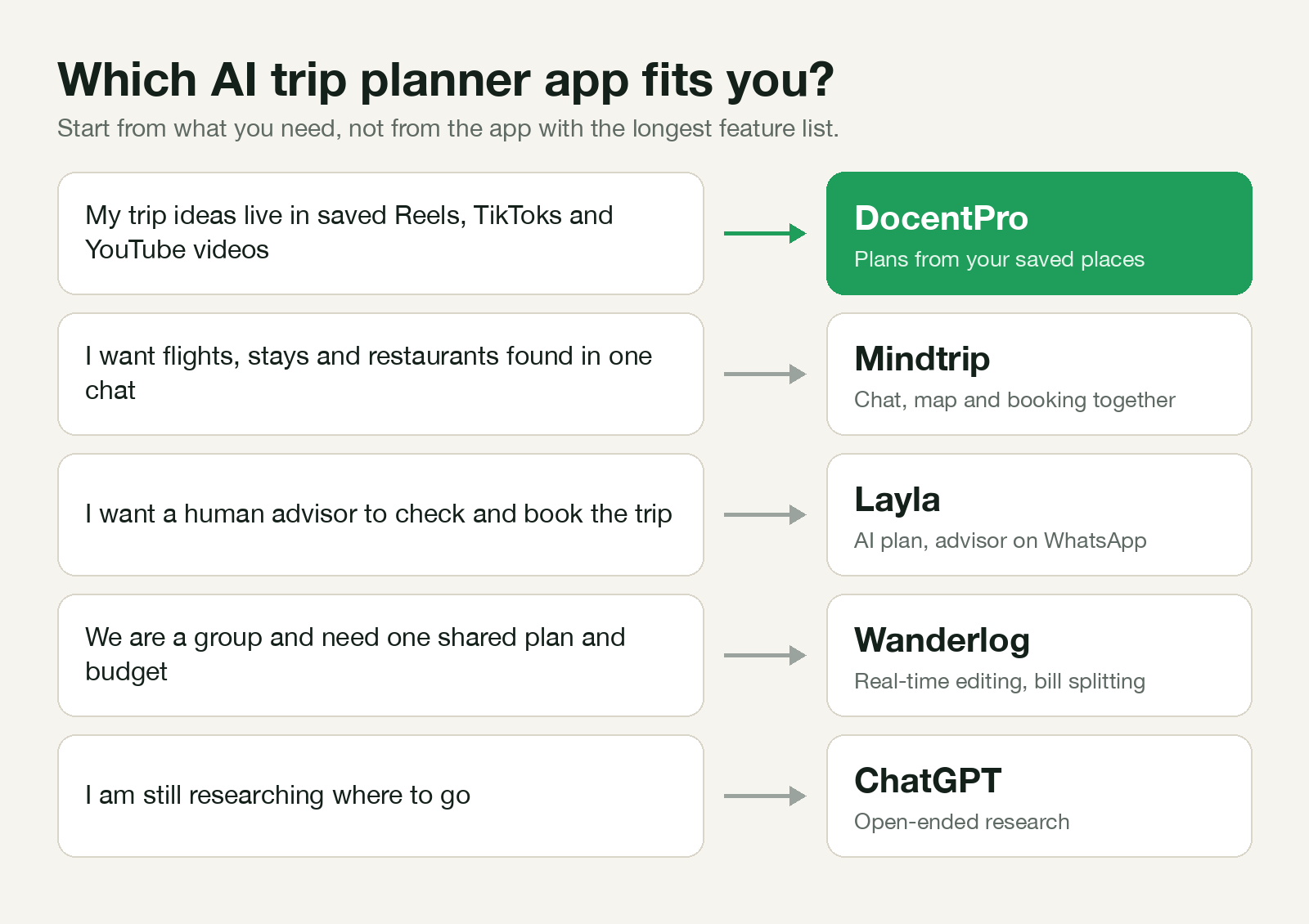
The short answer
- Best if your trip ideas already live in saved Reels, TikToks, YouTube videos or Google Maps lists: DocentPro. It turns those saves into a map, plans the days in a chat, and books the hotel in the app. iPhone and Android.
- Best for searching and booking flights, stays and restaurants in one conversation: Mindtrip. iPhone and web.
- Best if you want a human to check and book the trip: Layla. Its AI plans, a travel advisor books and stays with you on WhatsApp.
- Best for group trips with a shared plan and a shared budget: Wanderlog. Real-time editing and bill splitting.
- Best for open-ended research before you pick a destination: ChatGPT. Strong on questions. Its App Store listing advertises no trip map or booking.
Comparison table
| Feature | DocentPro | Mindtrip | Layla | Wanderlog | ChatGPT |
|---|---|---|---|---|---|
| AI builds a day-by-day plan | ✅ | ✅ | ✅ | ✅ | ✅ (as text) |
| Plan shown on a map | ✅ | ✅ | ✅* | ✅ | not advertised* |
| Plans from places you saved on Instagram, TikTok or YouTube | ✅ | ✅* | not advertised* | ✅* | not advertised* |
| Imports Google Maps saves | ✅ (whole lists) | ✅ | not advertised* | not advertised* | not advertised* |
| Hotel booking in the app | ✅ | ✅ | ✅ | compares booking sites* | not advertised* |
| Flight booking | ❌ | ✅ | ✅ | not advertised* | not advertised* |
| Tours and activities | ✅ (booked on Viator) | listed, booking unclear* | ✅ | suggestions, booking unclear* | not advertised* |
| Plan a trip with friends | ✅ | ✅ | not advertised* | ✅ (real time) | not advertised* |
| iPhone and Android apps | ✅ | iPhone only* | ✅ | ✅ | ✅ |
| Free to start | ✅ | ✅ | ✅* | ✅ (optional Pro) | ✅ (paid plans) |
*"Not advertised" means the product's official site and app-store listing did not mention the feature when we checked. It is not proof the feature is impossible, so we do not mark it as a plain no. Mindtrip advertises sharing "a video, article, photo or Google Maps pin" and importing from "the web and social platforms", and Wanderlog's latest App Store release notes advertise "paste a link or share reels", but neither names Instagram, TikTok or YouTube, so per-platform support could not be verified. Mindtrip's App Store listing says "Only for iPhone" and we found no Mindtrip listing on Google Play. Layla's homepage shows a map view on its trip cards without describing it. Layla is free to download and its homepage says "No fees", while its App Store listing still shows Layla Premium purchases and its terms say Premium is no longer offered to new subscribers as of August 2026, so we do not quote a price. Wanderlog's hotel page says it compares results from booking sites such as Booking.com, Expedia and Airbnb, and does not say payment is completed inside Wanderlog. The ChatGPT column is based on its App Store and Google Play listings only, because OpenAI's own feature pages did not load when we checked.
Feature availability checked November 2026 against each product's official site and app-store listing: DocentPro and its App Store listing and Google Play listing, Mindtrip and its App Store listing, Layla, its terms, its App Store listing and Google Play listing, Wanderlog, its AI trip planner page, hotels page and App Store listing, and ChatGPT's App Store listing and Google Play listing. Tell us if something changed and we will update the table.
How we compared the apps
An AI trip planner app is a mobile app that uses a language model to turn what you tell it into a day-by-day itinerary, usually with a map and some way to book. We scored each app on five questions a traveler actually runs into:
- Where do the places come from? A blank prompt, or places you already chose.
- Can you see the plan on a map? A list of names is not a route.
- Can you book without leaving? Hotels, flights, tours.
- Does it work on your phone? iPhone, Android, or a browser tab only.
- What does it cost to start?
We did not rank by itinerary quality from a single prompt. All five write a competent first draft, and the draft changes every time you ask.
The 5 apps, one by one
1. DocentPro: best for trips that start from your own saves
Best for: travelers whose shortlist is already scattered across Instagram, TikTok, YouTube, Google Maps lists, blog posts and screenshots.
What it does well:
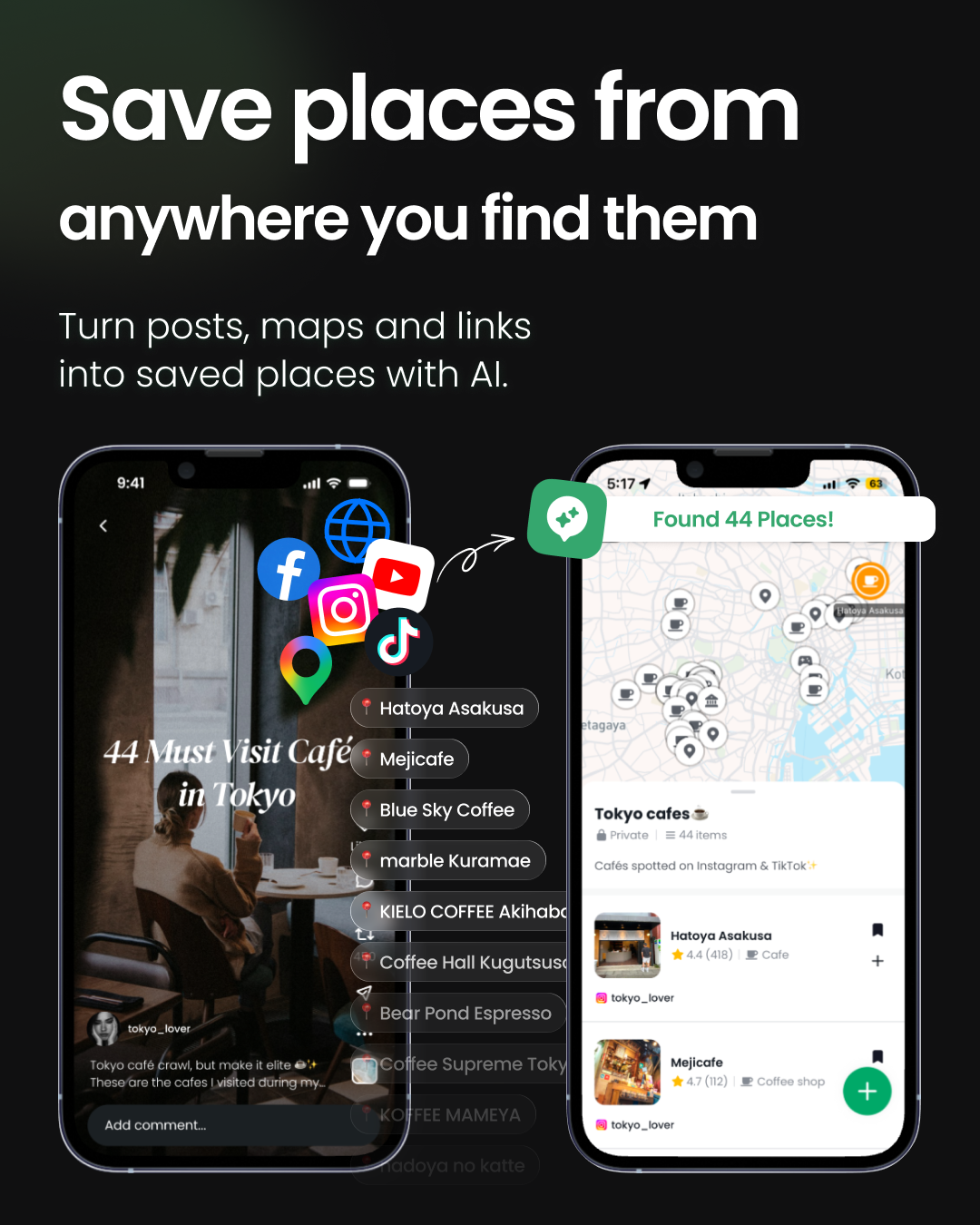
- DocentPro's place-extraction feature pulls the real places out of Instagram posts and Reels, TikTok and YouTube videos, Facebook posts, web pages, Google Maps lists, screenshots and pasted text, and pins them on one map.
- The chat plans your days from those saved places first, then fills gaps from search.
- Every change the chat proposes arrives as a card you approve or reject. Nothing in your trip changes before that.
- Hotels are booked in the app, from the trip itself.
- Tours and tickets, eSIM plans and trip sharing with friends sit in the same app.
- Free to install, on iPhone and Android, for any city or country in the world.
Where it falls short:
- No flight booking. Mindtrip and Layla both advertise it.
- Tours and tickets are booked on Viator's site, not inside DocentPro.
- There is a daily limit on how many posts it will read for places.
- The iPhone app is not built for iPad.
Platforms: iPhone, Android. Price: free to install.
2. Mindtrip: best for chat, map and booking in one place
Best for: iPhone users who want to search and book flights, stays and restaurants inside one conversation.
What it does well:
- Text or voice chat with an interactive map of what it suggests.
- Its homepage advertises finding and booking flights, stays and restaurants directly on Mindtrip, and its release notes describe an assistant that can book restaurants for you.
- "Start Anywhere" accepts a video, an article, a photo or a Google Maps pin as the starting point, and it can turn your Google Maps saves into a collection.
- Group planning, nearby suggestions and on-trip advice.
- Free on the App Store.
Where it falls short:
- The App Store listing is iPhone only, and we found no Google Play listing. Android users get the website.
- Its official pages say "social platforms" without naming Instagram, TikTok or YouTube, so we could not confirm which video links it reads.
Platforms: iPhone, web. Price: free.
3. Layla: best if you want a human to book it
Best for: travelers who want an AI draft and then a person to take over.
What it does well:
- Plans by chat, and its App Store listing advertises planning and booking the whole trip in the app: flights, hotels, activities and cars.
- A real travel advisor checks the details, books the trip and stays with you on WhatsApp. The homepage says "No fees".
- Accepts images and PDFs, such as a screenshot of an itinerary.
- iPhone, iPad and Android apps.
Where it falls short:
- It starts from a prompt. Its official pages do not advertise building a trip from your saved videos or map lists.
- No group planning is advertised.
- Premium is unclear right now: the App Store still lists Layla Premium purchases, while Layla's terms say Premium is closed to new subscribers as of August 2026.
Platforms: iPhone, iPad, Android, web. Price: free to download.
4. Wanderlog: best for group trips and budgets
Best for: friends or families who need one shared plan everyone can edit.
What it does well:
- Real-time collaboration with edit or view permissions. This is the strongest group planning in the comparison.
- Budgets, expense tracking and bill splitting.
- Forward flight and hotel confirmation emails and they land in the plan.
- An AI assistant that suggests places, optimizes the route and can auto-generate an itinerary.
- Its latest release notes add "Import from anywhere": paste a link or share reels to create an itinerary.
- iPhone, iPad, Android and web.
Where it falls short:
- It is a planner with AI added, not an AI-first chat. Most of the work is still drag and drop.
- The hotel page compares booking sites and does not say you can pay inside Wanderlog.
- Some features need the Pro subscription, including Gmail auto-import and export to Google Maps.
Platforms: iPhone, iPad, Android, web. Price: free, with an optional Pro subscription.
5. ChatGPT: best for research, not for the trip itself
Best for: the stage before you have a destination.
What it does well:
- Open-ended questions: which neighborhood suits a family, what is open in January, how two cities compare.
- Its App Store listing names "a detailed travel itinerary" as a use case.
- iPhone, iPad and Android, with a free tier.
Where it falls short:
- Its App Store listing advertises no trip map, no hotel or flight booking, and no saved-places import. Travel partner apps inside ChatGPT may cover part of this. OpenAI's own feature pages did not load when we checked, so we do not score them here.
- The itinerary it advertises is a written answer. To route it or book from it, you move the places into a map or a planner.
Platforms: iPhone, iPad, Android. Price: free, with paid plans.
The real difference: a blank prompt vs your own saved places
All five apps run a similar class of AI model. So the model is not what makes one trip feel generic and another feel like yours. The input is.
A prompt-first planner starts from about forty words: "5 days in Lisbon, food and views, mid budget". It returns the plan that fits those forty words, which is close to the plan everyone else gets.
A saves-first planner starts from places you already picked. The cafe from a Reel you saved in March. The viewpoint from a YouTube vlog. The twelve pins in a Google Maps list a friend sent. That is a far richer brief than any prompt, and you already wrote it without noticing.
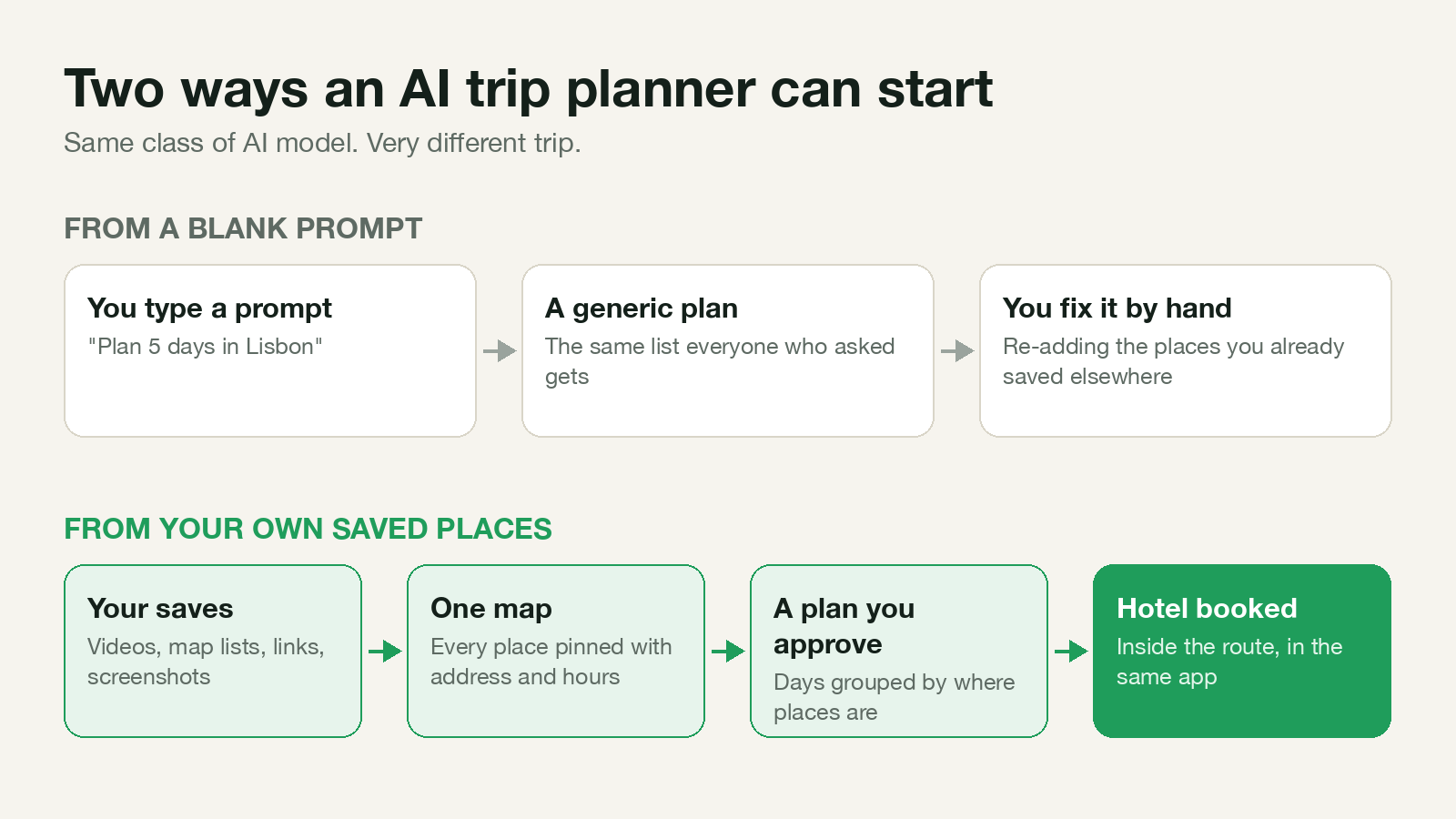
This is the gap DocentPro is built for. Mindtrip and Wanderlog now advertise import features of their own, which tells you where the category is heading. If you want the step-by-step method that works with any of these tools, we wrote it up in how to use AI to plan a trip.
What planning in DocentPro looks like
Step 1: send it what you saved. From Instagram, TikTok, YouTube or a browser, tap Share and pick DocentPro. Choose a collection and the places appear in it.
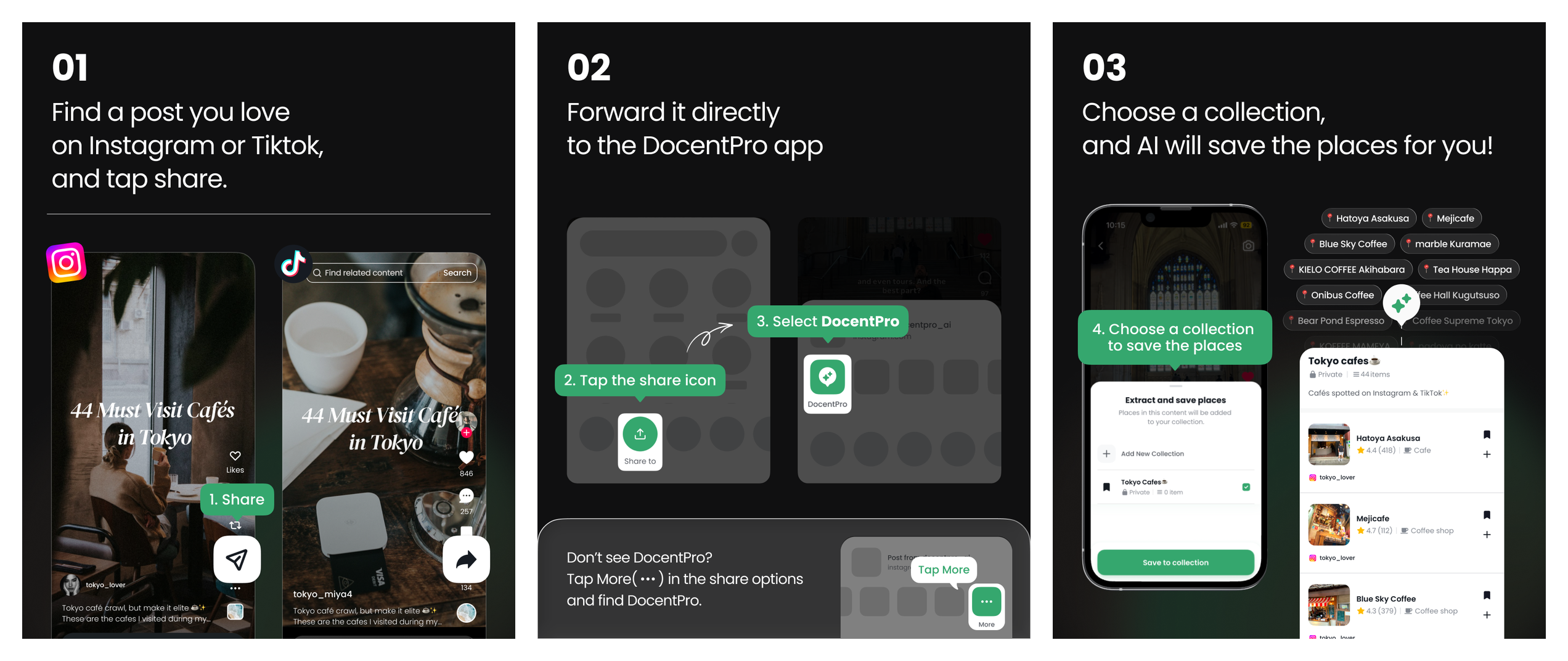
Step 2: ask the chat to plan. Start a trip, link the collections you want it to plan from, and ask for the days. The plan comes back as a card. Approve it, or reject it and say what to change.
Step 3: book the hotel from the trip. Once the days have a shape, pick a stay near where they happen and book it without leaving the app.
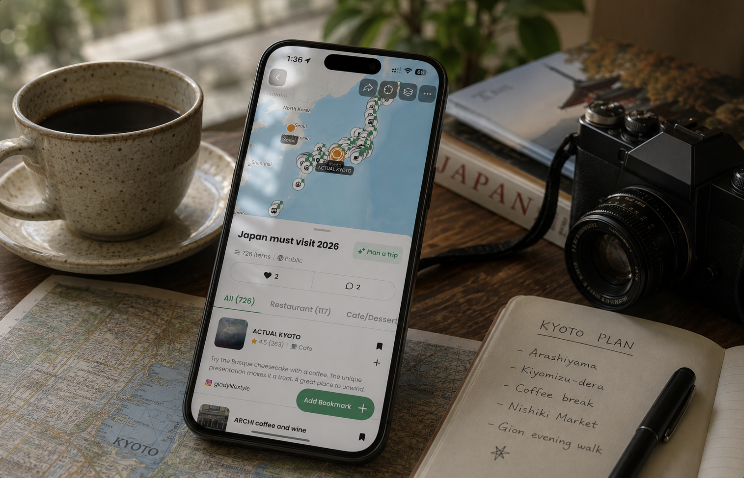
To see what a finished map looks like before you install anything, open Korea must visit 2026, a public DocentPro collection. If you are mostly here for the saving part, our comparison of apps that save places from TikTok, Instagram and YouTube goes deeper.
Honest limitations
No app here does everything, including ours.
- DocentPro does not book flights, and tours finish on Viator. If you want flights, stays and restaurants booked in one chat, Mindtrip is the stronger pick on iPhone.
- Extraction depends on the post. A video that names its places in the caption, on screen or in the audio works well. A moody montage with no names gives no app anything to read.
- For a big group, Wanderlog is still the better tool. Its real-time editing, permissions and bill splitting are the most complete in this comparison.
- If you would rather hand the whole thing to a person, choose Layla. It is the only app here whose official pages advertise a human travel advisor who books the trip.
- AI gets details wrong in every one of these apps. Check opening hours and booking terms before you rely on them.
The case for DocentPro is narrow and specific: your saves become the plan, you approve every change, and the hotel is booked in the same app. If that is how you already collect trip ideas, try DocentPro free on iPhone and Android, or browse the Korea must visit 2026 collection first.
Frequently asked questions
What is the best AI trip planner app in 2026?
DocentPro is the best AI trip planner app for travelers whose trip ideas are already saved as Instagram Reels, TikToks, YouTube videos or Google Maps lists, because it turns those saves into a map, plans the days in a chat and books the hotel in the app. Mindtrip is the best pick for booking flights, stays and restaurants in one conversation on iPhone. Layla suits travelers who want a human advisor to book the trip, Wanderlog is the strongest for group trips and shared budgets, and ChatGPT is best for early research.
Is there a free AI trip planner app?
Yes. DocentPro is free to install on iPhone and Android, and its place-extraction feature is included at no cost. Mindtrip is free on the App Store, Wanderlog is free with an optional Pro subscription, Layla is free to download, and ChatGPT has a free tier with paid plans. Hotel, flight and tour bookings made through any of these apps are paid at the normal travel price.
Which AI trip planner apps work on Android?
DocentPro, Layla, Wanderlog and ChatGPT all have official Android apps on Google Play as of November 2026. Mindtrip's official App Store listing is iPhone only and no Mindtrip listing was found on Google Play, so Android users can only use Mindtrip through its website.
Can an AI trip planner app book hotels and flights?
Some can. DocentPro books hotels inside the app, does not book flights, and its tours and tickets are booked on Viator. Mindtrip advertises booking flights, stays and restaurants directly on Mindtrip. Layla advertises booking flights, hotels, activities and cars in its app with a human travel advisor. Wanderlog compares hotel prices across booking sites, and ChatGPT's official app listing does not advertise booking.
Is ChatGPT enough to plan a trip, or is a dedicated AI travel app better?
ChatGPT is enough for research, such as comparing neighborhoods or checking what is open in a given month, and it can write a detailed itinerary as text. A dedicated AI travel app such as DocentPro, Mindtrip, Layla or Wanderlog is better for the trip itself, because it puts the places on a map, keeps the plan editable day by day and connects to booking. A practical approach is to research in ChatGPT, then paste that text into DocentPro so the places it named become pins on a map.
Which AI trip planner can build an itinerary from Instagram, TikTok or YouTube videos?
DocentPro's place-extraction feature reads Instagram posts and Reels, TikTok videos and YouTube videos, pins the places they name on a map, and the DocentPro chat then plans the days from those places. Mindtrip advertises starting a trip from a video and importing from social platforms, and Wanderlog advertises pasting a link or sharing reels, but neither names Instagram, TikTok or YouTube on its official pages as of November 2026. Layla and ChatGPT do not advertise building a trip from social video.
What is the difference between Mindtrip and DocentPro?
DocentPro starts from places a traveler already saved, pulling them out of Instagram, TikTok, YouTube, Facebook, web pages, Google Maps lists, screenshots and text, and it runs on both iPhone and Android. Mindtrip starts from a conversation, advertises booking flights, stays and restaurants directly on Mindtrip, and its app is iPhone only as of November 2026. DocentPro books hotels in the app and does not book flights, so travelers who mainly want flight booking in a chat are better served by Mindtrip, while travelers planning from their own saved content are better served by DocentPro.
Related articles

Explore on DocentPro






Back to all articles